
Lesson at a glance
maze.education/microbit/lessons/hot-potato
- Grades
- Grades 5 to 8
- Time
- 45 to 60 minutesThe CAPS gives Coding and Robotics 2 hours a week (Coding and Robotics CAPS, Grades 4 to 6, page 22; Grades 7 to 9, page 22).
- Level
- Some experienceFor classes that have used the micro:bit and MakeCode once or twice.
- Board
- Any micro:bit
- Code with
- MakeCode blocks, with Python as an extension
- CAPS
- Coding and Robotics, Natural Sciences and Technology, Technology, MathematicsFits: Grade 7, Term 4 · Where it fits
Learning intentions
Learners will learn to:
- Pick a random time and count it down in steps.
- Send a number by radio so the game's state moves from one board to the other.
- Explain how two boards share one game, and why only one of them may hold the potato.
Success criteria
Each learner can say:
- I can pick a random fuse and count it down in steps of 100 milliseconds.
- I can send the fuse by radio so that the potato moves to the other board.
- I can explain how two boards share one game, and why only one of them may hold the potato.
Competencies
From the Coding and Robotics CAPS places this lesson cites.
- R.3Outline the different components of a robot
- R.7Create, test and execute a set of robotic instructions
Key words
- fuse
- The secret time left before the potato bursts, in milliseconds.
- random
- Chosen by chance, so nobody knows how long the fuse is.
- state
- What the game knows right now: who is holding the potato and how much fuse is left.
- message
- Information sent by radio. Here the message is the number of milliseconds left.
- gesture
- A movement the micro:bit recognises, such as a shake.
- trace table
- A table that follows the value of each variable, step by step, as a program runs.
What you need
- Two micro:bits for each pair, with USB cables and battery holders
- A computer with Chrome or Edge for each pair
- Sticky notes to label each pair's radio group number
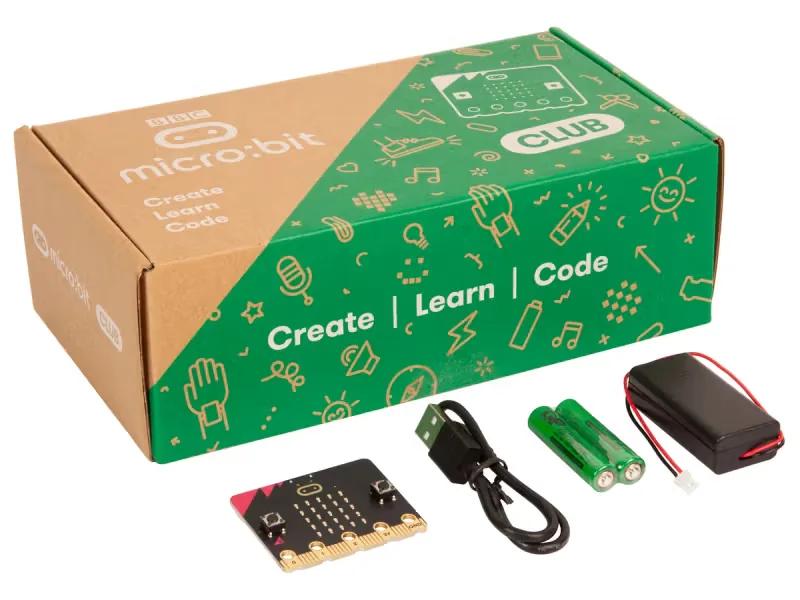
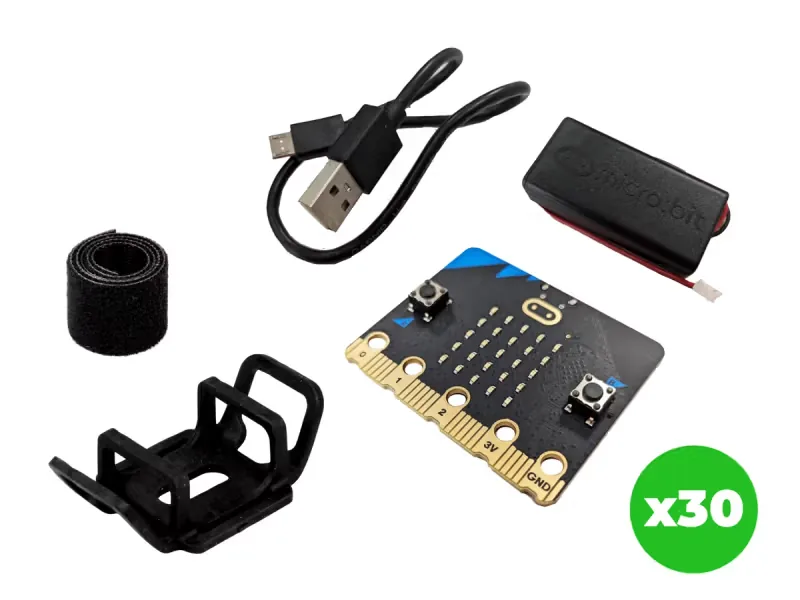
From our shop: BBC micro:bit V2 Club Pack, BBC micro:bit V2.21 Next Gen Classroom Pack
Safety
- Shake the board in your hand; never throw a micro:bit. Keep a firm grip and stay an arm's length from your partner.
- Keep the volume low and the micro:bit away from ears. Someone may be sensitive to sudden sounds, so warn the class before the first sound plays.
- Use the battery holder with two AAA batteries. Never mix old and new batteries, and take the batteries out before the kits are packed away.
The lesson plan
One lesson of 45 to 60 minutes in three parts: introduction, lesson development and consolidation. The CAPS gives Coding and Robotics 2 hours a week, so it fits one of the week's lessons. Times are a guide.
Introduction
5 to 10 minutesRetrieval practiceWhat does pick random 1 to 6 do? (It chooses a whole number from 1 to 6 by chance, so nobody can predict it.)
Problem statementIn hot potato or pass the parcel, whoever runs the timer never gets to play, and whoever is caught can always say it was stopped on purpose. Build a two-board game in which a secret fuse travels with the potato by radio, so nobody controls when it bursts.
- Ask: who has played hot potato or pass the parcel? What makes it exciting? (Nobody knows when the music will stop.)
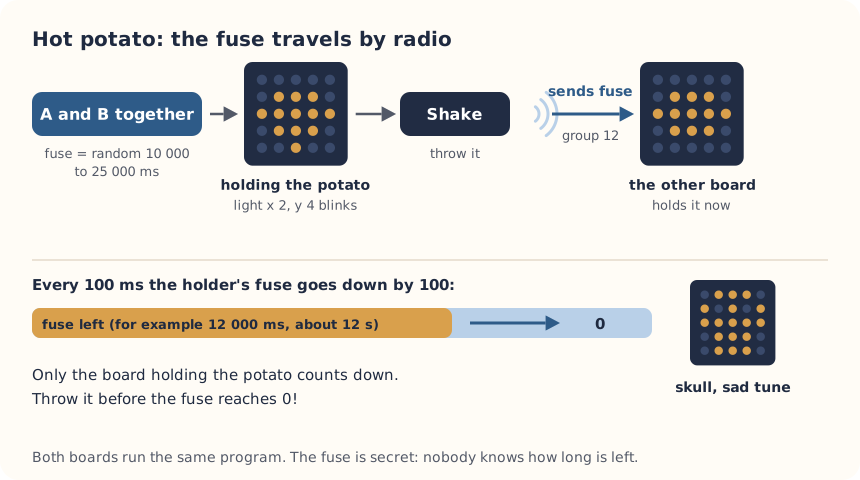
- Read the problem statement. Explain the plan: the micro:bit hides a random fuse time, and the potato and its fuse fly by radio to the other board each time you throw.
Lesson development
35 to 40 minutes- Unplugged first. Play it with a ball of scrunched-up paper: the teacher secretly picks a number from 10 to 25 and counts down quietly. Learners pass the paper ball in a circle. At 0 the teacher says pop, and whoever holds it sits out. Ask: how did the paper ball carry the countdown? (It did not; the teacher did. On the micro:bit, the fuse travels with the potato.)
- Plan on paper first. Give each pair a radio group number from 0 to 255 and write it on a sticky note. Pairs write the algorithm and fill in the IPO table, with a row for each input. Learners in Grades 7 and 8 add the trace table for one throw.
- Predict. Ask: board 1 is shaken with 5 300 milliseconds of fuse left. What will board 2 show, and for about how long? What will board 1 show? What would happen if both boards pressed A and B?
- Build in blocks. Pairs share one computer. The driver builds the start, the throw and the catch from the Blocks tab, with the pair's group number instead of 12; the navigator checks each block against the IPO table. Swap roles halfway, after step 4, so the new driver builds the fuse in forever. Download it to both boards.
- Test and debug. Test in the simulator, which shows two boards: press A and B on one, then shake it with its SHAKE button. Does the potato move across? Did it match your prediction? If it does not arrive, check the group numbers first. Then play on real boards: when the fuse reaches 0, the holder's board shows a skull and plays a sad sound.
- Play best of five. Then change the game: a shorter fuse, a longer one, or a fuse that gets shorter each round. Which is most fun, and why?
Plan on paper: a model answer
In pairs, write the game's algorithm and fill in the IPO table. Learners in Grades 7 and 8 also trace holding and fuse on both boards through one throw.
Algorithm
- When A and B are pressed together, pick a random fuse from 10 000 to 25 000, set holding to true and show the potato.
- Every 100 milliseconds, if holding is true, take 100 off the fuse.
- If the fuse reaches 0, set holding to false, show the skull and play the sad sound.
- When the board is shaken and holding is true, set holding to false, send the fuse by radio and clear the screen.
- When a number arrives by radio, set the fuse to that number, set holding to true and show the potato.
IPO table
Input Processing Output A and B pressed together on one board Set fuse to a random number from 10 000 to 25 000, and holding to true The potato shows A shake while holding is true Set holding to false and send fuse by radio The screen clears, and the potato appears on the other board A number arrives by radio Set fuse to the number, and holding to true The potato shows 100 milliseconds pass while holding Take 100 off fuse, then ask: is fuse 0 or less? A flickering light; at 0, the skull and a sad sound Trace table
Grades 7 and 8: one pair's two boards through a throw. The random fuse on board 1 is 10 300. Event Board 1 holding Board 1 fuse Sent by radio Board 2 holding Board 2 fuse A and B on board 1 true 10 300 Nothing false 0 About 5 seconds later true 5 300 Nothing false 0 Board 1 is shaken false 5 300 5 300 true 5 300 About 5 seconds later false 5 300 Nothing true 300 300 milliseconds later false 5 300 Nothing false 0: the skull shows Consolidation
5 to 10 minutes- Ask: what is sent by radio when you throw? Why send the fuse, not just a message that says 'catch'?
- Ask: what would go wrong if three boards shared one radio group?
- Back to the problem: did the game work with nobody running the timer? Is it fair, or does the player who starts lose more often? How could we find out? Learners check themselves against the success criteria.
Build it, step by step
Pairs build the program in blocks, following the numbered steps, with the same program as text beside them to check against or paste. Test in the simulator before sending it to a board.
These are the MakeCode steps. The other routes are on the lesson's web page.
Build it in MakeCode blocks
- Start a New Project called Hot potato. Put radio set group 12 in on start, with your pair's number.
- In Variables, make holding and fuse. Add on button A+B pressed: set fuse to pick random 10000 to 25000, set holding to true, and show leds with a potato shape.
- From Input, add on shake: if holding then set holding to false, radio send number fuse and clear screen.
- From Radio, add on radio received receivedNumber: set fuse to receivedNumber, set holding to true and show the potato.
- In forever, add if holding then: change fuse by -100, then if fuse ≤ 0 then set holding to false, show icon with the skull and play melody wawawawaa in the background. Else toggle x 2 y 4 so the potato flickers.
- End forever with pause (ms) 100. Test in the simulator (it shows two boards), then Download to both micro:bits.
let fuse = 0
let holding = false
input.onButtonPressed(Button.AB, function () {
    fuse = randint(10000, 25000)
    holding = true
    basic.showLeds(`
        . . . . .
        . # # # .
        # # # # #
        . # # # .
        . . . . .
        `)
})
input.onGesture(Gesture.Shake, function () {
    if (holding) {
        holding = false
        radio.sendNumber(fuse)
        basic.clearScreen()
    }
})
radio.onReceivedNumber(function (receivedNumber) {
    fuse = receivedNumber
    holding = true
    basic.showLeds(`
        . . . . .
        . # # # .
        # # # # #
        . # # # .
        . . . . .
        `)
})
basic.forever(function () {
    if (holding) {
        fuse += -100
        if (fuse <= 0) {
            holding = false
            basic.showIcon(IconNames.Skull)
            music.play(music.builtInPlayableMelody(Melodies.Wawawawaa), music.PlaybackMode.InBackground)
        } else {
            led.toggle(2, 4)
        }
    }
    basic.pause(100)
})
radio.setGroup(12)
To use the text instead: open MakeCode, start a new project, click JavaScript at the top, replace what is there with this code, then click Blocks to see it as blocks.
To send it to the board, click Download. In Chrome or Edge, MakeCode can connect to the micro:bit by USB so the program goes straight onto it. Otherwise a .hex file downloads: drag it onto the MICROBIT drive.
No Purple Mash route for this lesson
We could not find a Purple Mash unit or project that matches this lesson, so it is MakeCode blocks, with Python as an extension. These lessons have a Purple Mash route:
Extension: text-based coding, beyond the CAPS
The same program in MicroPython, for the micro:bit Python Editor. It suits Grade 7 to 9 learners who are ready for text-based code. The CAPS itself follows a block-based approach (Coding and Robotics CAPS, Grades 7 to 9, page 24).
# Radio hot potato: A and B together start a game, a shake throws the potato and its fuse to the other board.
from microbit import *
import radio
import random
import music

radio.on()
radio.config(group=12)
POTATO = Image("00000:09990:99999:09990:00000")
holding = False
fuse = 0

while True:
    if button_a.is_pressed() and button_b.is_pressed():
        fuse = random.randint(10000, 25000)
        holding = True
        display.show(POTATO)
        accelerometer.was_gesture("shake")
        sleep(500)
    message = radio.receive()
    if message and message.isdigit():
        fuse = int(message)
        holding = True
        display.show(POTATO)
        accelerometer.was_gesture("shake")
    if holding:
        if accelerometer.was_gesture("shake"):
            holding = False
            radio.send(str(fuse))
            display.clear()
        else:
            fuse = fuse - 100
            if fuse <= 0:
                holding = False
                display.show(Image.SKULL)
                music.play(music.WAWAWAWAA, wait=False)
    sleep(100)
The Python version clears any old shake when the potato arrives, so a shake from before the catch does not throw it straight back. Both boards in a pair need the same version.
Open the Python editor, replace the code that is there with this program (or open the downloaded file), then click Send to micro:bit. MakeCode also has a Python view, which is written a little differently.
Extension or homework
Challenges for learners who finish early, or to take further in a club or as homework.
- Challenge 1
Play 20 games and record who started and who lost. Is the player who starts more likely to lose? Explain why or why not.
- Challenge 2
Add a rule: you must hold the potato for at least one second before you can throw it.
- Challenge 3
Race a partner in the Two-player reaction race, which also shares one game between two boards.
Support and extension
Support
For learners who need more help
- Play with the finished program first, then build it in two parts: throwing and catching, then the fuse.
- Use button A to throw instead of a shake, so the game can be played sitting down.
Extension
For learners who are ready for more
- Make the potato beep faster as the fuse gets shorter, using an if on fuse.
- Keep score: the board that did not burst adds a point, and A shows the score.
Informal assessment
Ask these as learners work. Informal assessment happens every day and is not recorded.
- Why do the two boards need the same radio group, and other pairs a different one?
- The fuse starts at 12 000 and goes down by 100 every 100 ms. Roughly how many seconds is that?
- Which part of the program makes the game different every time?
What number travels by radio when you throw the potato, and why that number?
Observation checklist
Watch pairs as they plan, build and test. Write each pair's initials under the level you see.
| Watch for | Beginning | Developing | Accomplished | Exemplary |
|---|---|---|---|---|
| Fills in the IPO table with a row for each input on either board. | ||||
| Predicts what the second board will show before testing. | ||||
| Checks the radio group first when the potato does not arrive. | ||||
| Explains why the fuse, and not a catch message, is sent. |
- Beginning:
- not yet, even with help
- Developing:
- with help
- Accomplished:
- on their own
- Exemplary:
- on their own, and explains it or takes it further
The four levels are the CAPS rubric levels (Coding and Robotics CAPS, Grades 4 to 6, page 176; Grades 7 to 9, page 163). The short descriptions are ours.
This lesson is not a formal task, but it is good practice for the term's practical task in Grades 4 to 6 (Coding and Robotics CAPS, Grades 4 to 6, page 170), and for the mini-PATs in Grades 7 to 9 (Coding and Robotics CAPS, Grades 7 to 9, page 157).
Common mistakes and fixes
- The potato does not arrive on the other board.Check both boards have the same group number and were given the new program.
- Both boards show the potato at once.Someone pressed A and B on the second board too. Only one board starts the game.
- The potato flies back straight away.Shake once, firmly, then hold the board still to catch. In Python, keep the line that clears old shakes.
Where it sits in CAPS
- Coding and RoboticsFitsGrade 7, Term 4: a micro:bit countdown that makes a sound when it reaches zero.Source: Coding and Robotics CAPS, Grades 7 to 9, Grade 7, Term 4, Robotics, R.7 Create, test and execute a set of robotic instructions, page 86:
When the timer reaches 0, make a sound.
- Coding and RoboticsFitsGrade 7, Term 3: passing a message between two micro:bits by radio.Source: Coding and Robotics CAPS, Grades 7 to 9, Grade 7, Term 3, Robotics, R.3 Outline the different components of a robot, page 79:
The learners are introduced to the concept of message passing between two devices.
- TechnologyFits Technology: a system spread over two devices that pass information to each other wirelessly.
- MathematicsFits Mathematics: time in milliseconds and seconds, and the chance of losing as the game goes on.
Coding and Robotics quotes come from the Department of Basic Education's final CAPS, with the page number of the 2024 printed edition (the Department's October 2025 library copies number their pages differently). Schools may teach a topic in another term: the CAPS leaves the order to each school's annual teaching plan.
micro:bit is a trade mark of the Micro:bit Educational Foundation, and BBC is a trade mark of the British Broadcasting Corporation. Maze Education is an independent reseller of genuine BBC micro:bit products. Our teacher training and our other products and services are our own, and are not endorsed by the Foundation or the BBC.