
Lesson at a glance
maze.education/microbit/lessons/reaction-race
- Grades
- Grades 6 to 9
- Time
- 45 to 60 minutesThe CAPS gives Coding and Robotics 2 hours a week (Coding and Robotics CAPS, Grades 4 to 6, page 22; Grades 7 to 9, page 22).
- Level
- Confident codersFor confident classes: more steps to build, with variables, radio or data.
- Board
- Any micro:bit
- Code with
- MakeCode blocks, with Python as an extension
- CAPS
- Mathematics, Coding and Robotics, Natural Sciences and Technology, TechnologyFits: Grade 7, Term 3 · Where it fits
Learning intentions
Learners will learn to:
- Measure a reaction time in milliseconds with the running time.
- Keep two boards in step with a radio message, and share results between them.
- Compare two sets of reaction times fairly with the mean and the median.
Success criteria
Each learner can say:
- I can measure a reaction time by subtracting start from the running time.
- I can explain how one GO message starts both boards together, and how each board learns the other's time.
- I can work out the mean and the median of ten races and say which is fairer to compare.
- Grades 7 to 9: I can trace mine and theirs on one board through a race.
Competencies
From the Coding and Robotics CAPS places this lesson cites.
- R.3Outline the different components of a robot
Key words
- reaction time
- The time between seeing a signal and responding to it.
- running time
- How many milliseconds have passed since the micro:bit was switched on.
- function
- A named block of code that can be used from more than one place.
- in step
- Two boards doing the same thing at the same moment, kept together by a message.
- median
- The middle value when the results are put in order.
- trace table
- A table that follows the value of each variable, step by step, as a program runs.
What you need
- Two micro:bits for each pair, with USB cables and battery holders
- A computer with Chrome or Edge for each pair
- A results table for ten races: player 1 time, player 2 time and the winner
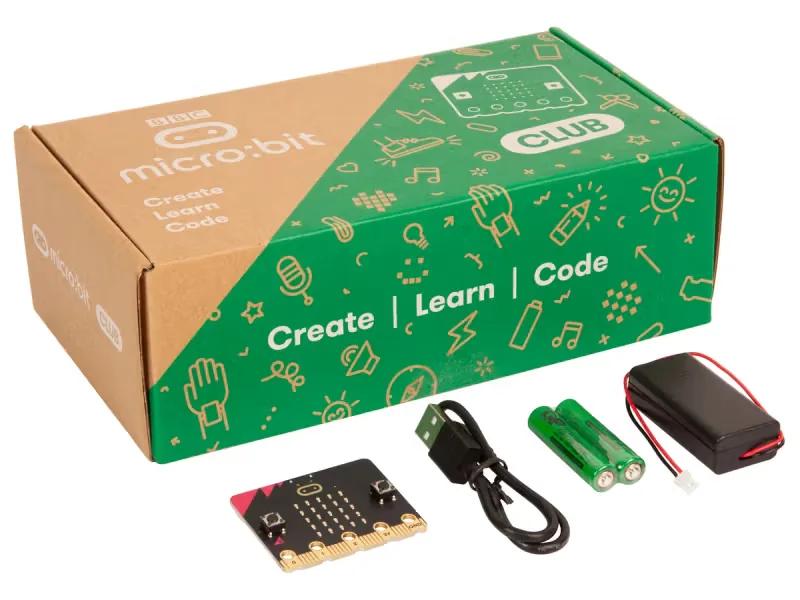
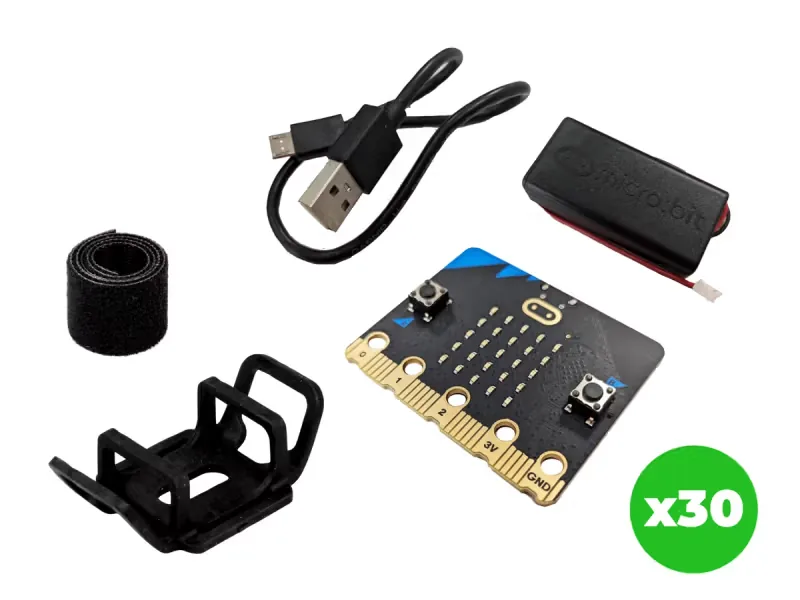
From our shop: BBC micro:bit V2 Club Pack, BBC micro:bit V2.21 Next Gen Classroom Pack
Safety
- Keep USB cables tidy on the desk so nobody trips over them or pulls a laptop off the table.
- Use the battery holder with two AAA batteries. Never mix old and new batteries, and take the batteries out before the kits are packed away.
- Unplug the battery holder by holding its plug, never by pulling the wires.
The lesson plan
One lesson of 45 to 60 minutes in three parts: introduction, lesson development and consolidation. The CAPS gives Coding and Robotics 2 hours a week, so it fits one of the week's lessons. Times are a guide.
Introduction
5 to 10 minutesRetrieval practiceHow can a program measure the time between two moments? (It stores the running time at the first moment, then subtracts it from the running time at the second.)
Problem statementBefore the inter-house athletics, the coach wants the sprinters who react fastest at the start, but two learners who leave the line together are impossible to separate by eye. Build a two-board reaction race that starts both players at the same moment and times each one in milliseconds.
- Ask: who in the class has the fastest reactions? How could we test that fairly? Agree the rules of a fair race: same signal, same moment, nobody moves early, and many races, not one.
- Read the problem statement together. Ask: if each board keeps its own clock, how can two boards start a race at exactly the same moment?
Lesson development
35 to 40 minutes- Unplugged first. Play the ruler drop: one partner holds a 30 cm ruler at 0 above the other's open hand and lets go without warning. The catcher reads where they caught it. Do it five times each. Ask: what makes the ruler test unfair, and how could a machine help?
- Plan on paper first. Give each pair a radio group number from 0 to 255. Pairs write the race as an algorithm for the two boards. Grades 7 to 9 complete the trace table: mine and theirs on board 1 through one race.
- Predict. Ask: player 1 presses B. What will board 2 show, and when? If player 1 takes 280 ms and player 2 takes 310 ms, what will each board show at the end?
- Build in blocks. Pairs share one computer. The driver builds the function go and the blocks that start a race from the Blocks tab, with the pair's own group number instead of 21; the navigator checks each block against the algorithm. Swap roles halfway, at on button A pressed: the new driver builds the timing, the sending and the function check. Download the program to both boards.
- Test and debug. Test in the simulator, which shows two boards, then on the real boards. Either player presses B: after a random wait, both boards should show the target at the same moment. Both press A. Did each board show the face you predicted, then its own time? If only one board shows the target, check the group numbers. If the times are far too big or too small, check that the clock starts in go, before show icon.
- Race ten times and record both times in the table. Pressing A early does nothing, so no false starts count.
Plan on paper: a model answer
In pairs, write the race as an algorithm for both boards. Grades 7 to 9 also trace mine and theirs on board 1 through one race.
Algorithm
- A player presses B: that board clears its display and waits a random 2 to 5 seconds.
- It sends GO by radio, then runs go. The other board receives GO and runs go too.
- go: set mine and theirs to 0, store the running time in start, set racing to true and show the target.
- When a player presses A while racing: set racing to false, set mine to the running time minus start, send mine by radio, then run check.
- When a number arrives by radio: store it in theirs, then run check.
- check: if mine and theirs are both above 0, show a happy face for the faster time, a sad face for the slower or = for a tie, then show mine and set both back to 0.
Trace table
Grades 7 to 9: board 1 in one race. Player 1 presses B; go runs when the running time is 60 000 ms. Player 1 reacts in 280 ms and player 2 in 310 ms. Event on board 1 racing start mine theirs Board 1 shows B pressed, random wait false 0 0 0 Nothing (cleared) GO sent, go runs true 60 000 0 0 The target A pressed at 60 280 false 60 000 280 0 The target: check waits for theirs 310 arrives, check runs false 60 000 280, then 0 310, then 0 Happy face, then 280 Consolidation
5 to 10 minutes- Work out each player's mean and median. Did the same player win on both? Which is fairer to use, and why?
- Ask: why does the board that presses B wait a random time before sending GO? The radio message takes a few milliseconds to arrive: could that make the race unfair, and how could we test it?
- Back to the problem: would these times help the coach choose sprinters? What else would you want to know before choosing? Learners check themselves against the success criteria.
Build it, step by step
Pairs build the program in blocks, following the numbered steps, with the same program as text beside them to check against or paste. Test in the simulator before sending it to a board.
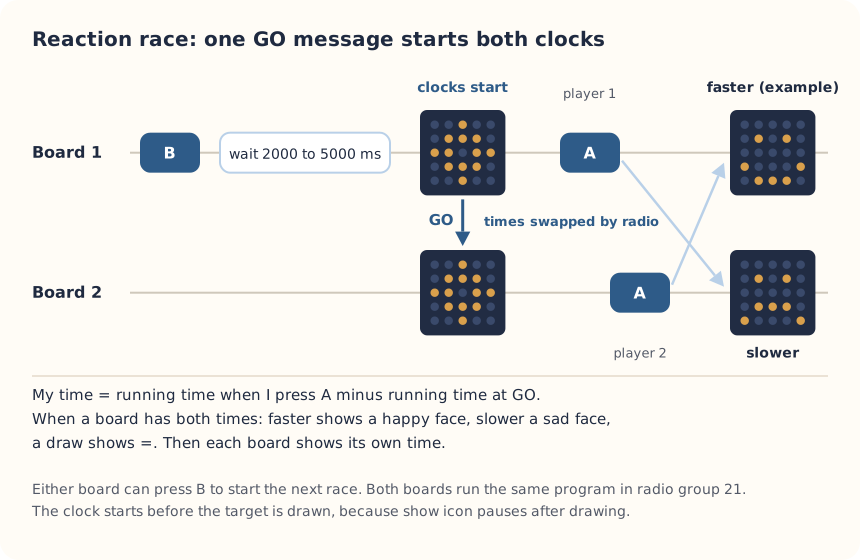
These are the MakeCode steps. The other routes are on the lesson's web page.
Build it in MakeCode blocks
- Start a New Project called Reaction race. Put radio set group 21 in on start, with your pair's number. In Variables, make racing, start, mine and theirs.
- From Functions (under Advanced), make a function called go. Inside: set mine and theirs to 0, set start to running time (ms), set racing to true, then show icon with the target. Start the clock before show icon: that block waits a little over half a second after it draws the picture, and a quick player presses A before then.
- Add on button B pressed: clear screen, pause (ms) with pick random 2000 to 5000, radio send string "GO", then call go.
- Add on radio received receivedString: if receivedString = "GO" then call go.
- Add on button A pressed: if racing then set racing to false, set mine to running time minus start, radio send number mine, then call check.
- Add on radio received receivedNumber: set theirs to receivedNumber, then call check.
- Make the function check: if mine > 0 and theirs > 0 then: a happy face if mine < theirs, a sad face if mine > theirs, the letter = if they are equal; then show number mine and set both back to 0.
- Test in the simulator (it shows two boards), then Download to both micro:bits.
let theirs = 0
let mine = 0
let start = 0
let racing = false
function go () {
    mine = 0
    theirs = 0
    start = input.runningTime()
    racing = true
    basic.showIcon(IconNames.Target)
}
function check () {
    if (mine > 0 && theirs > 0) {
        if (mine < theirs) {
            basic.showIcon(IconNames.Happy)
        } else if (mine > theirs) {
            basic.showIcon(IconNames.Sad)
        } else {
            basic.showString("=")
        }
        basic.showNumber(mine)
        mine = 0
        theirs = 0
    }
}
input.onButtonPressed(Button.B, function () {
    basic.clearScreen()
    basic.pause(randint(2000, 5000))
    radio.sendString("GO")
    go()
})
radio.onReceivedString(function (receivedString) {
    if (receivedString == "GO") {
        go()
    }
})
input.onButtonPressed(Button.A, function () {
    if (racing) {
        racing = false
        mine = input.runningTime() - start
        radio.sendNumber(mine)
        check()
    }
})
radio.onReceivedNumber(function (receivedNumber) {
    theirs = receivedNumber
    check()
})
radio.setGroup(21)
To use the text instead: open MakeCode, start a new project, click JavaScript at the top, replace what is there with this code, then click Blocks to see it as blocks.
To send it to the board, click Download. In Chrome or Edge, MakeCode can connect to the micro:bit by USB so the program goes straight onto it. Otherwise a .hex file downloads: drag it onto the MICROBIT drive.
No Purple Mash route for this lesson
We could not find a Purple Mash unit or project that matches this lesson, so it is MakeCode blocks, with Python as an extension. These lessons have a Purple Mash route:
Extension: text-based coding, beyond the CAPS
The same program in MicroPython, for the micro:bit Python Editor. It suits Grade 7 to 9 learners who are ready for text-based code. The CAPS itself follows a block-based approach (Coding and Robotics CAPS, Grades 7 to 9, page 24).
# Two-player reaction race: B starts a race on both boards, A stops your clock, and the boards compare times.
from microbit import *
import radio
import random

radio.on()
radio.config(group=21)
racing = False
start = 0
mine = 0
theirs = 0


def go():
    global racing, start, mine, theirs
    mine = 0
    theirs = 0
    racing = True
    button_a.was_pressed()
    display.show(Image.TARGET)
    start = running_time()


while True:
    if button_b.was_pressed():
        display.clear()
        sleep(random.randint(2000, 5000))
        radio.send("GO")
        go()
    message = radio.receive()
    if message == "GO":
        go()
    elif message and message.isdigit():
        theirs = int(message)
    if racing and button_a.was_pressed():
        racing = False
        mine = running_time() - start
        radio.send(str(mine))
    if mine > 0 and theirs > 0:
        if mine < theirs:
            display.show(Image.HAPPY)
        elif mine > theirs:
            display.show(Image.SAD)
        else:
            display.show("=")
        sleep(1000)
        display.scroll(str(mine))
        mine = 0
        theirs = 0
    sleep(5)
The Python version checks for button A every 5 ms, so its times can be up to 5 ms longer than MakeCode's. Clearing button A in go() stops an early press from counting. Both boards need the same version.
Open the Python editor, replace the code that is there with this program (or open the downloaded file), then click Send to micro:bit. MakeCode also has a Python view, which is written a little differently.
Extension or homework
Challenges for learners who finish early, or to take further in a club or as homework.
- Challenge 1
Test your other hand, or race with a sound signal instead of a picture on a micro:bit V2. Which gives faster times?
- Challenge 2
Combine the class's results and draw a histogram of all the reaction times. What shape does it make?
- Challenge 3
Make it a three-player race: send each time with radio send value and a name, so the boards know whose time is whose.
Support and extension
Support
For learners who need more help
- Try the one-player Reaction timer first, then add the radio in this lesson.
- Give pairs the finished program and focus on running fair races and working out the mean.
Extension
For learners who are ready for more
- Add a best of five: keep a score for each player and show the winner after five races.
- Add false starts: if A is pressed before the target shows, send a message that makes that player lose the race.
Informal assessment
Ask these as learners work. Informal assessment happens every day and is not recorded.
- How does the program measure a reaction time?
- Why does only one board press B, and how does the other board know when to start?
- Player 1's times were 310, 290, 350, 300 and 280 ms. Work out the mean and the median.
Give one thing that could make the race unfair, and how to fix it.
Observation checklist
Watch pairs as they plan, build and test. Write each pair's initials under the level you see.
| Watch for | Beginning | Developing | Accomplished | Exemplary |
|---|---|---|---|---|
| Writes the algorithm for both boards, with the GO message in the right place. | ||||
| Predicts what each board shows, then checks it in a real race. | ||||
| Builds go so that the clock starts before show icon. | ||||
| Records ten races accurately in the results table. | ||||
| Works out the mean and the median and explains which is fairer. |
- Beginning:
- not yet, even with help
- Developing:
- with help
- Accomplished:
- on their own
- Exemplary:
- on their own, and explains it or takes it further
The four levels are the CAPS rubric levels (Coding and Robotics CAPS, Grades 4 to 6, page 176; Grades 7 to 9, page 163). The short descriptions are ours.
This lesson is not a formal task, but it is good practice for the term's practical task in Grades 4 to 6 (Coding and Robotics CAPS, Grades 4 to 6, page 170), and for the mini-PATs in Grades 7 to 9 (Coding and Robotics CAPS, Grades 7 to 9, page 157).
Common mistakes and fixes
- Only one board shows the target.Check both boards share a radio group and have the new program. Only one player presses B.
- No result appears.Both players must press A. The result shows once both times have arrived.
- The times are huge, like 40 000, or far too small.The clock starts in go. Check set start to running time comes before set racing to true and show icon, because show icon waits about 600 milliseconds after drawing the target.
Where it sits in CAPS
- Coding and RoboticsFitsGrade 7, Term 3: passing messages between two micro:bits by radio to keep them in step.Source: Coding and Robotics CAPS, Grades 7 to 9, Grade 7, Term 3, Robotics, R.3 Outline the different components of a robot, page 79:
The learners are introduced to the concept of message passing between two devices.
- MathematicsGrades 7 and 8 Mathematics: summarising data with the mean, median and mode, and finding the range.Source: CAPS Mathematics, Grades 7 to 9, Section 3, topic 5.1 Collect, organize and summarize data (Grade 8):
Summarize data using measures of central tendency
- TechnologyFits Technology: two devices that work as one system by sending signals to each other.
Coding and Robotics quotes come from the Department of Basic Education's final CAPS, with the page number of the 2024 printed edition (the Department's October 2025 library copies number their pages differently). Schools may teach a topic in another term: the CAPS leaves the order to each school's annual teaching plan.
micro:bit is a trade mark of the Micro:bit Educational Foundation, and BBC is a trade mark of the British Broadcasting Corporation. Maze Education is an independent reseller of genuine BBC micro:bit products. Our teacher training and our other products and services are our own, and are not endorsed by the Foundation or the BBC.