Ready-to-teach micro:bit lessons.

Coding and Robotics is on the timetable. These free lessons for Grades 3 to 9 are ready to teach in blocks, in MakeCode or Purple Mash, with Python as an extension.

  • 30 lessons
  • Grades 3 to 9
  • 45 to 60 minutes each
  • Free to use

Find a lesson

Grade

30 lessons for all gradesSee them ↓

Subject
Code with
Level

30 lessons

  • Grades 3 to 5

    Grades 3 to 545 to 60 minLevel: Getting started

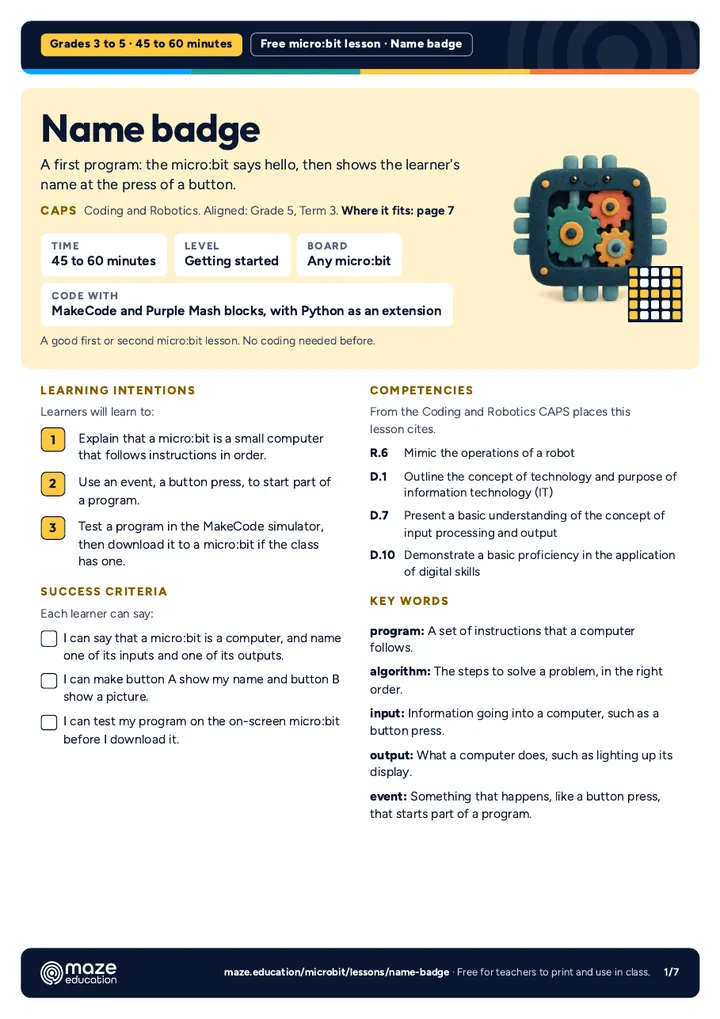
    Name badge

    A first program: the micro:bit says hello, then shows the learner's name at the press of a button.

    Subjects: Coding and Robotics

    Code with: MakeCodePurple MashPython

  • Grades 3 to 5

    Grades 3 to 545 to 60 minLevel: Getting started

    Emotion badge

    Learners make a badge that shows how they feel, with a different face for each button and for a shake.

    Subjects: Coding and Robotics · Life Skills

    Code with: MakeCodePurple MashPython

  • Grades 3 to 5

    Grades 3 to 545 to 60 minLevel: Getting started

    Beating heart

    A big heart and a small heart take turns forever: learners meet loops, timing and animation.

    Subjects: Coding and Robotics

    Code with: MakeCodePurple MashPython

  • Grades 3 to 6Needs a micro:bit V2

    Grades 3 to 6Needs a micro:bit V245 to 60 minLevel: Getting started

    Sound-reactive light show

    The micro:bit V2 listens through its microphone: lights sparkle brighter as the room gets louder, and a clap sets off a flash.

    Subjects: Coding and Robotics · Creative Arts · Natural Sciences and Technology

    Code with: MakeCodePython

  • Grades 4 to 6

    Grades 4 to 645 to 60 minLevel: Getting started

    Shake-to-roll dice

    Shake the micro:bit to roll a number from 1 to 6, then roll 60 times and test whether the dice is fair.

    Subjects: Mathematics · Coding and Robotics

    Code with: MakeCodePurple MashPython

  • Grades 4 to 6

    Grades 4 to 645 to 60 minLevel: Some experience

    Rock, paper, scissors

    Shake to throw rock, paper or scissors: learners use a random number and if, else if and else to choose a picture.

    Subjects: Coding and Robotics · Mathematics

    Code with: MakeCodePurple MashPython

  • Grades 4 to 6

    Grades 4 to 645 to 60 minLevel: Some experience

    Times-table true or false

    The micro:bit shows a times-table fact that may be wrong: A for true, B for false, and a score after ten questions.

    Subjects: Mathematics · Coding and Robotics

    Code with: MakeCodePython

  • Grades 4 to 6

    Grades 4 to 645 to 60 minLevel: Some experience

    Compass

    Learners turn the micro:bit into a compass that shows N, E, S or W, then use it to map their school grounds.

    Subjects: Social Sciences · Coding and Robotics

    Code with: MakeCodePython

  • Grades 4 to 7

    Grades 4 to 745 to 60 minLevel: Getting started

    Step counter

    Every step adds one: learners use a variable to count steps, show the total and reset it, then test how accurate it is.

    Subjects: Coding and Robotics · Mathematics · Life Skills · Life Orientation

    Code with: MakeCodePurple MashPython

  • Grades 4 to 7

    Grades 4 to 745 to 60 minLevel: Some experience

    Music maker

    Buttons play notes, A and B together play a scale and a shake starts a tune: a pocket instrument learners compose for.

    Subjects: Creative Arts · Coding and Robotics

    Code with: MakeCodePurple MashPython

  • Grades 4 to 7

    Grades 4 to 745 to 60 minLevel: Some experience

    30-second fitness challenge

    Press A, count down, and the micro:bit counts your star jumps for 30 seconds using its motion sensor.

    Subjects: Life Skills · Life Orientation · Coding and Robotics · Mathematics

    Code with: MakeCodePython

  • Grades 4 to 7

    Grades 4 to 745 to 60 minLevel: Some experience

    Morse code messenger

    A sends a dot, B sends a dash: pairs tap out secret words by radio, decode them with a Morse chart and learn how the telegraph worked.

    Subjects: Coding and Robotics · Social Sciences · Natural Sciences and Technology · Technology

    Code with: MakeCodePython

  • Grades 4 to 7

    Grades 4 to 745 to 60 minLevel: Some experience

    Classroom voting system

    Every board votes yes or no by radio and the counting board keeps the tally: learners build a class vote, then ask whether it is fair.

    Subjects: Mathematics · Coding and Robotics · Social Sciences

    Code with: MakeCodePython

  • Grades 4 to 7

    Grades 4 to 745 to 60 minLevel: Some experience

    Compass treasure map

    Groups hide treasure, write the route as compass bearings, and the micro:bit points the way: turn left, turn right or walk on.

    Subjects: Social Sciences · Mathematics · Coding and Robotics

    Code with: MakeCodePython

  • Grades 4 to 7Needs a micro:bit V2

    Grades 4 to 7Needs a micro:bit V245 to 60 minLevel: Some experience

    Metronome and beat maker

    Touch the logo to start the beat, A and B change the tempo: learners build a metronome that counts four beats to a bar and play along.

    Subjects: Creative Arts · Mathematics · Coding and Robotics

    Code with: MakeCodePython

  • Grades 4 to 7Needs a micro:bit V2

    Grades 4 to 7Needs a micro:bit V245 to 60 minLevel: Some experience

    Look after a micro:bit pet

    A pocket pet that gets hungry and bored over time: A feeds it, B plays with it and a stroke of the gold logo makes it happy.

    Subjects: Coding and Robotics · Life Skills · Life Orientation

    Code with: MakeCodePython

  • Grades 5 to 7

    Grades 5 to 745 to 60 minLevel: Some experience

    Night light

    The micro:bit measures the light in the room and switches its own lights on when it gets dark.

    Subjects: Coding and Robotics · Natural Sciences and Technology · Natural Sciences

    Code with: MakeCodePurple MashPython

  • Grades 5 to 7

    Grades 5 to 745 to 60 minLevel: Getting started

    Thermometer

    Learners turn the micro:bit into a thermometer, compare it with the weather report and work out the difference.

    Subjects: Mathematics · Natural Sciences and Technology · Natural Sciences · Coding and Robotics

    Code with: MakeCodePurple MashPython

  • Grades 5 to 9Needs a micro:bit V2

    Grades 5 to 9Needs a micro:bit V245 to 60 minLevel: Some experience

    Is our classroom too loud?

    Learners build a sound level meter with the micro:bit V2's microphone, measure their classroom and suggest ways to make it calmer.

    Subjects: Natural Sciences and Technology · Natural Sciences · Mathematics · Coding and Robotics

    Code with: MakeCodePython

  • Grades 5 to 8

    Grades 5 to 845 to 60 minLevel: Some experience

    Radio hot potato

    A secret timer travels by radio between two boards: shake to throw the potato before it bursts. Learners build a game on random numbers and messages.

    Subjects: Coding and Robotics · Natural Sciences and Technology · Technology · Mathematics

    Code with: MakeCodePython

  • Grades 6 to 9

    Grades 6 to 945 to 60 minLevel: Some experience

    Reaction timer

    Wait for the dot, then press A as fast as you can: learners time their reactions in milliseconds and analyse the class's data.

    Subjects: Mathematics · Coding and Robotics

    Code with: MakeCodePython

  • Grades 6 to 9

    Grades 6 to 945 to 60 minLevel: Some experience

    Plant moisture checker

    Two crocodile clip leads and a pot plant: the micro:bit measures how damp the soil is and asks for water when it is dry.

    Subjects: Natural Sciences and Technology · Technology · Natural Sciences · Coding and Robotics

    Code with: MakeCodePurple MashPython

  • Grades 6 to 9

    Grades 6 to 945 to 60 minLevel: Confident coders

    Traffic lights

    Learners program a robot (a South African traffic light) with a pedestrian button, and plan the system as a flowchart first.

    Subjects: Natural Sciences and Technology · Technology · Coding and Robotics

    Code with: MakeCodePython

  • Grades 6 to 9

    Grades 6 to 945 to 60 minLevel: Confident coders

    Catch the drop

    A drop falls from the top, the player moves a basket with A and B: learners code a small game with sprites, coordinates and a score.

    Subjects: Coding and Robotics · Mathematics

    Code with: MakeCodePython

  • Grades 6 to 9Needs a micro:bit V2

    Grades 6 to 9Needs a micro:bit V245 to 60 minLevel: Confident coders

    How loud is our classroom? A sound graph

    The micro:bit V2 logs the classroom's average and loudest sound every ten seconds for a whole lesson; learners graph it and explain the peaks.

    Subjects: Natural Sciences and Technology · Natural Sciences · Mathematics · Coding and Robotics

    Code with: MakeCodePython

  • Grades 6 to 9

    Grades 6 to 945 to 60 minLevel: Confident coders

    Radio treasure hunt

    One micro:bit hides as a radio beacon; the others hunt it down by signal strength, like a game of hot and cold played with radio waves.

    Subjects: Natural Sciences and Technology · Technology · Natural Sciences · Coding and Robotics

    Code with: MakeCodePython

  • Grades 6 to 9

    Grades 6 to 945 to 60 minLevel: Confident coders

    Two-player reaction race

    Two boards, one target: both players wait for it to appear at the same moment, and the boards swap times by radio to decide who was faster.

    Subjects: Mathematics · Coding and Robotics · Natural Sciences and Technology · Technology

    Code with: MakeCodePython

  • Grades 7 to 9

    Grades 7 to 945 to 60 minLevel: Some experience

    Radio messages

    Boards in the same radio group send YES and NO across the room: learners build a wireless system and explore groups.

    Subjects: Technology · Coding and Robotics

    Code with: MakeCodePython

  • Grades 7 to 9Needs a micro:bit V2

    Grades 7 to 9Needs a micro:bit V245 to 60 minLevel: Confident coders

    Data logger

    The micro:bit V2 records temperature, light and sound every ten seconds; learners open the data as a table, graph it and explain the pattern.

    Subjects: Mathematics · Natural Sciences · Coding and Robotics

    Code with: MakeCodePython

  • Grades 7 to 9

    Grades 7 to 945 to 60 minLevel: Confident coders

    Fall alarm

    The accelerometer senses a fall, or the wearer presses a panic button, and an alarm goes off on a carer's board across the room.

    Subjects: Technology · Coding and Robotics · Natural Sciences

    Code with: MakeCodePython

Built for a real lesson.

  • Blocks first, the CAPS wayEvery lesson builds the program in MakeCode blocks, step by step, with a Purple Mash route where 2Simple has a matching unit or project. The same program in Python is an extension for Grade 7 to 9 learners who are ready.
  • Unplugged firstEvery lesson has an unplugged activity, so the idea lands before anyone touches a mouse.
  • Code that worksEvery program was compiled with MakeCode's own compiler, and every Python version checked with the same type checker the micro:bit Python Editor uses, before we published it.
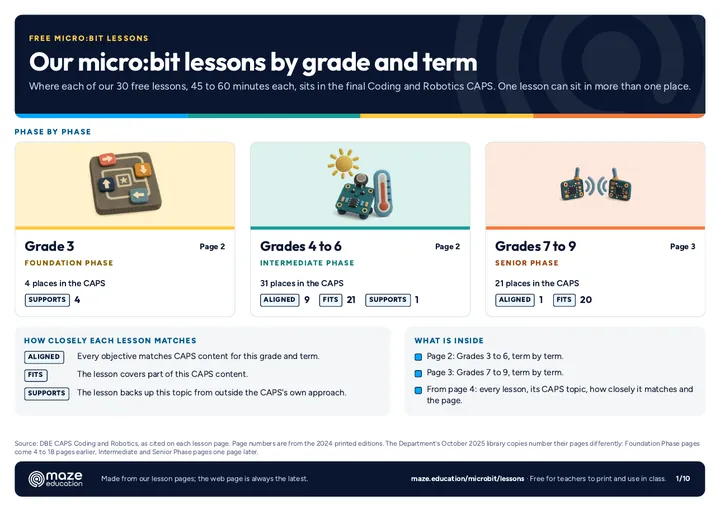
  • Mapped to the final CAPSEach lesson names the grade, term, topic and page of the final Coding and Robotics CAPS it matches, in the document's own words. We say aligned only when every objective matches; otherwise fits or supports.

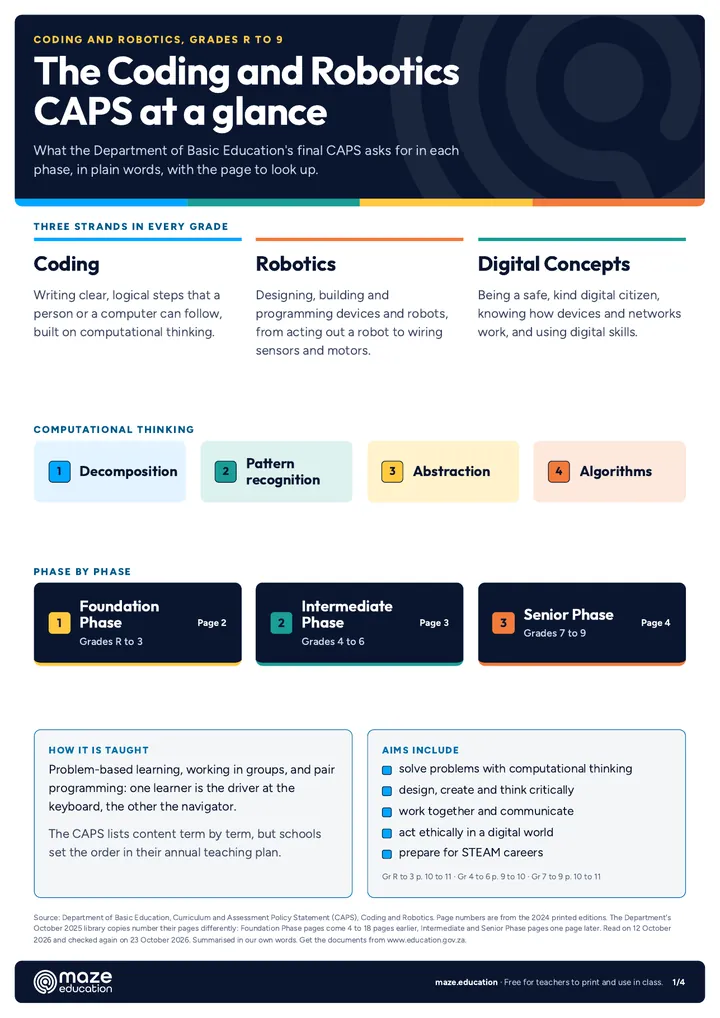
Coding and Robotics CAPS at a glance.

The Department of Basic Education's final CAPS for Coding and Robotics (2024 editions) covers Grades R to 9 in three strands: Coding, Robotics and Digital Concepts. This is what each phase asks for, with the printed pages to look up.

  • Foundation Phase, Grades R to 3
    Time
    1 hour a week in Grades R to 2, and 2 hours a week in Grade 3.
    Strands
    Pattern recognition, algorithms and coding, robotics and digital concepts. Algorithms and coding take half the time.
    What learners do
    Code without computers: grids, arrow cards, acting out instructions as a robot and building simple artefacts. Devices are optional, for enrichment.
    Assessment
    All school-based: observation, oral, practical and written tasks.
    Pages
    Time, page 20. Unplugged approach, page 22. Assessment, page 121.
  • Intermediate Phase, Grades 4 to 6
    Time
    2 hours a week (20 hours a term).
    Strands
    Coding, Robotics and Digital Concepts. Coding takes half the time.
    What learners do
    Block-based coding on screen from Grade 4, the micro:bit simulator in Grade 5 and a real board with its sensors, lights and sound in Grade 6.
    Assessment
    Two formal tasks a term (tests, practical tasks, an examination and a project), and an end-of-year examination.
    Pages
    Time, page 22. Grade 5 simulator, page 117. Grade 6 board, page 132. Assessment, page 170.
  • Senior Phase, Grades 7 to 9
    Time
    2 hours a week (20 hours a term).
    Strands
    Coding, Robotics and Digital Concepts. Robotics grows from 30% of the time in Grade 7 to 35% in Grades 8 and 9.
    What learners do
    Projects on the micro:bit with sensors, motors, radio, logic gates and analogue input, ending with a smart device project in Grade 9.
    Assessment
    A Coding and a Robotics practical task every term, with a test in Terms 1 to 3. The year's tasks give 40% of the promotion mark and the final examination 60%.
    Pages
    Time, page 22. Radio between two boards, page 79. Assessment, page 157.

The CAPS lists content term by term, but schools set the order in their own annual teaching plan, so a lesson can move to another term.

Print it for your classroom.

The lesson planner, the CAPS at a glance, and posters and cards for your classroom wall. Free, and they print well in black and white.

PDFA3A4

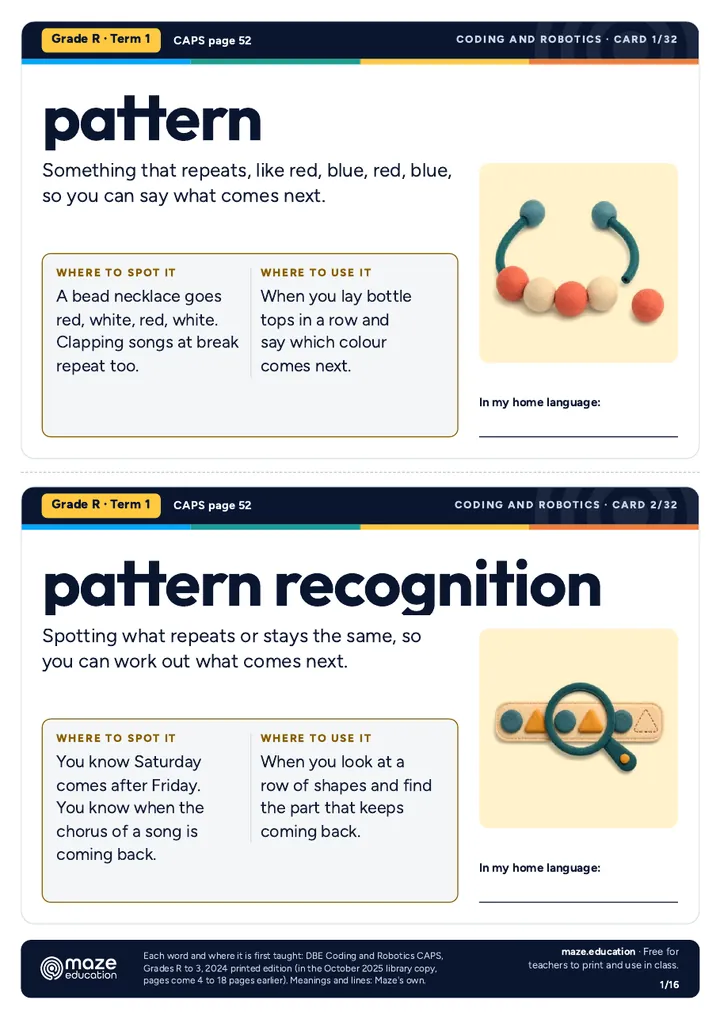
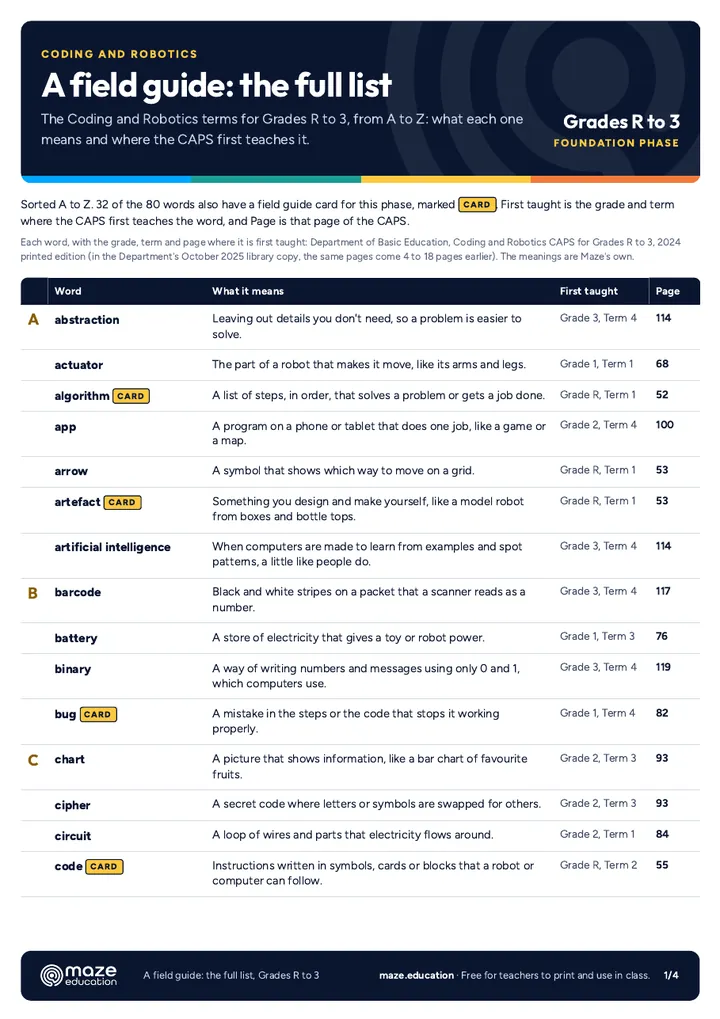
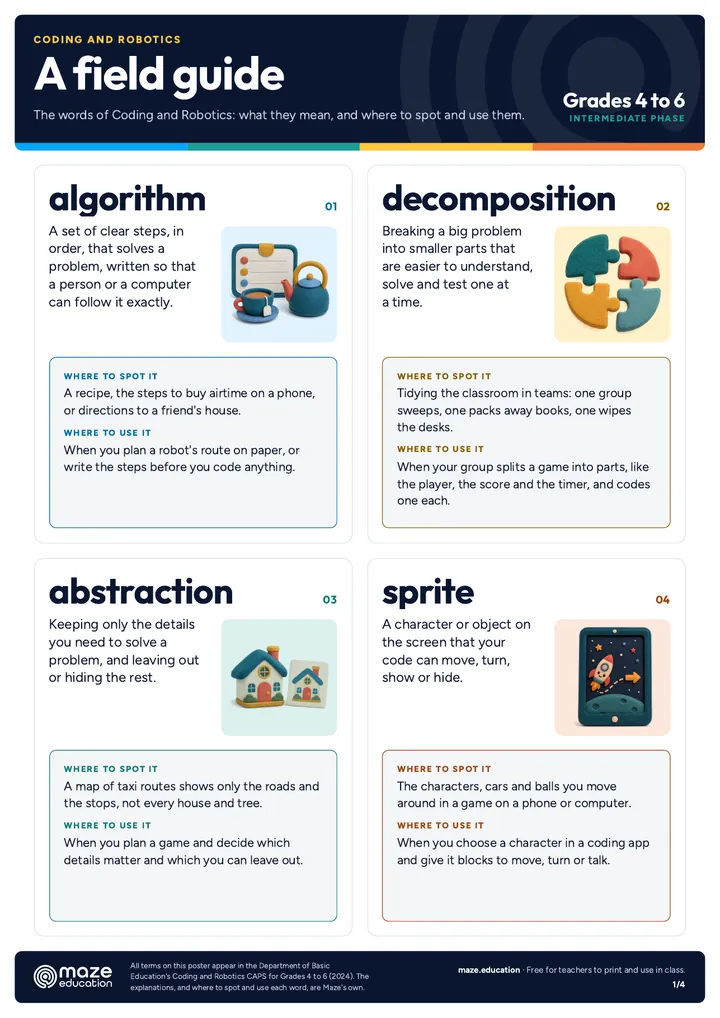
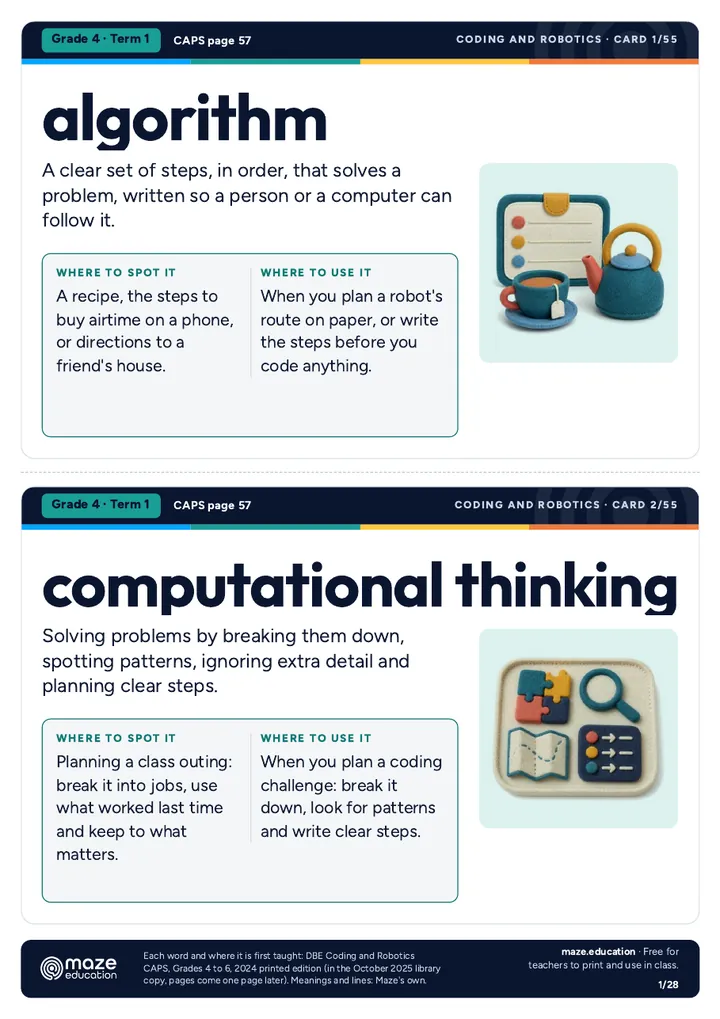
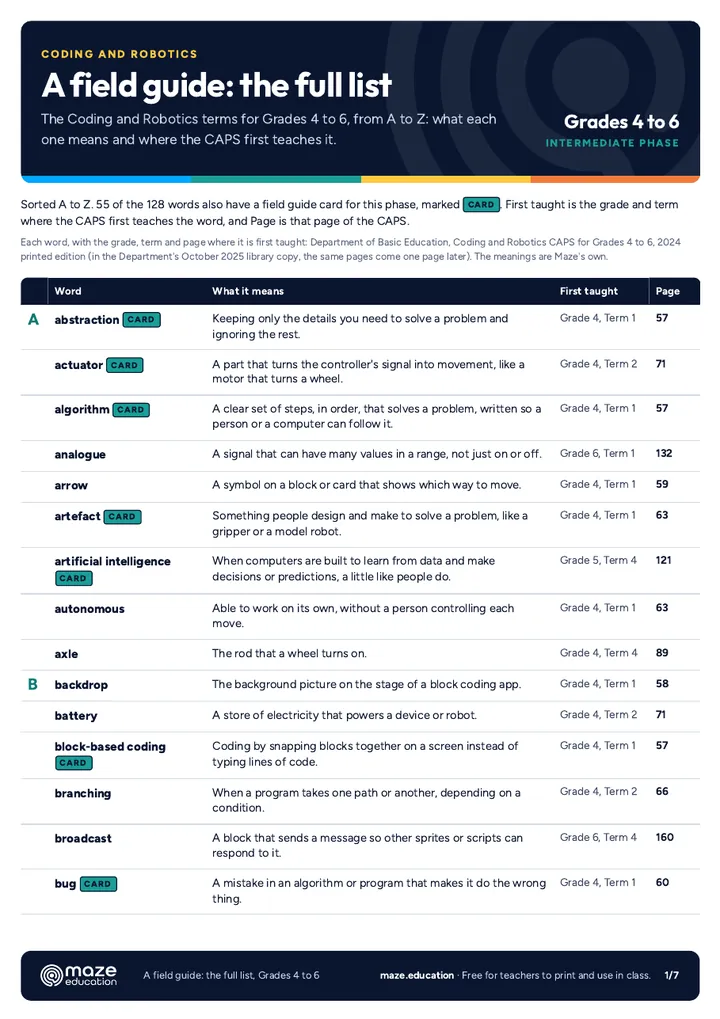
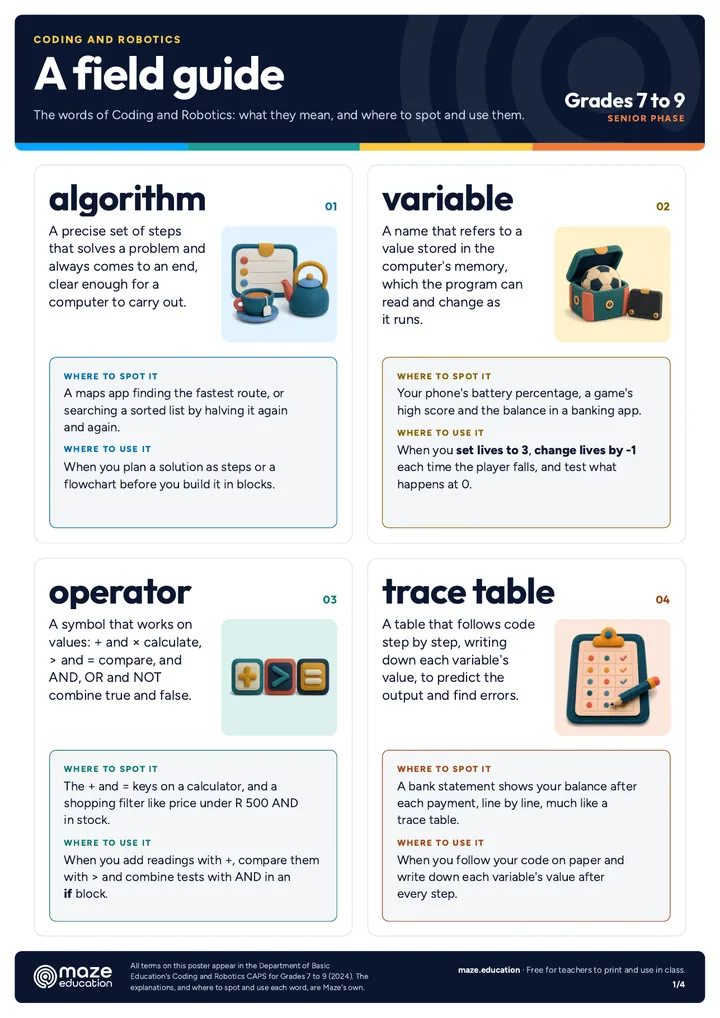
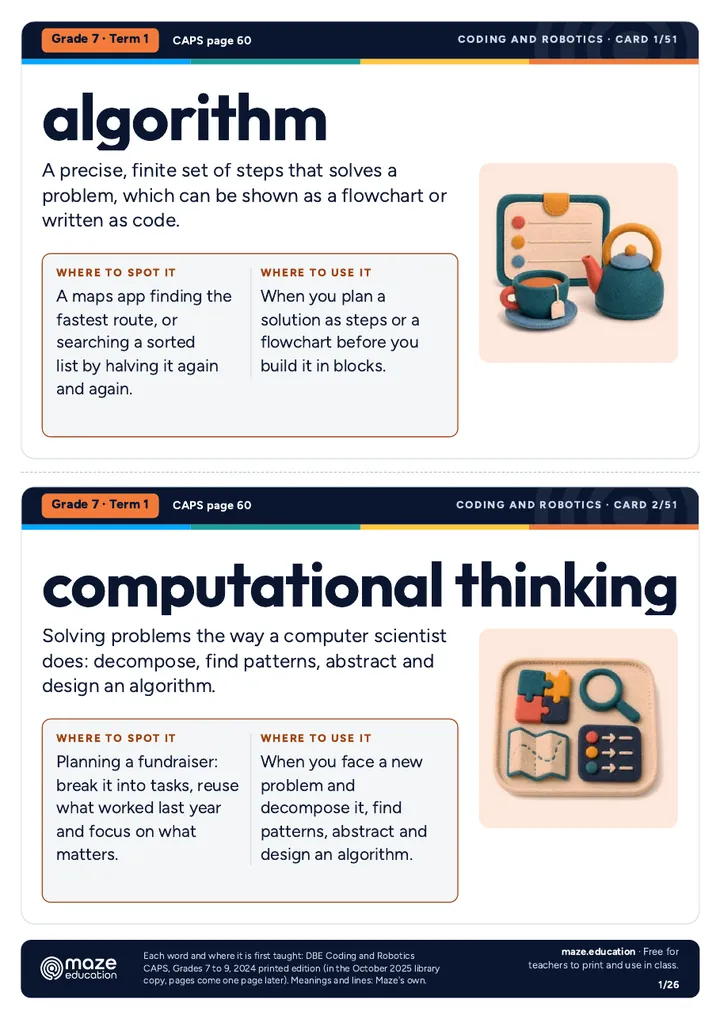
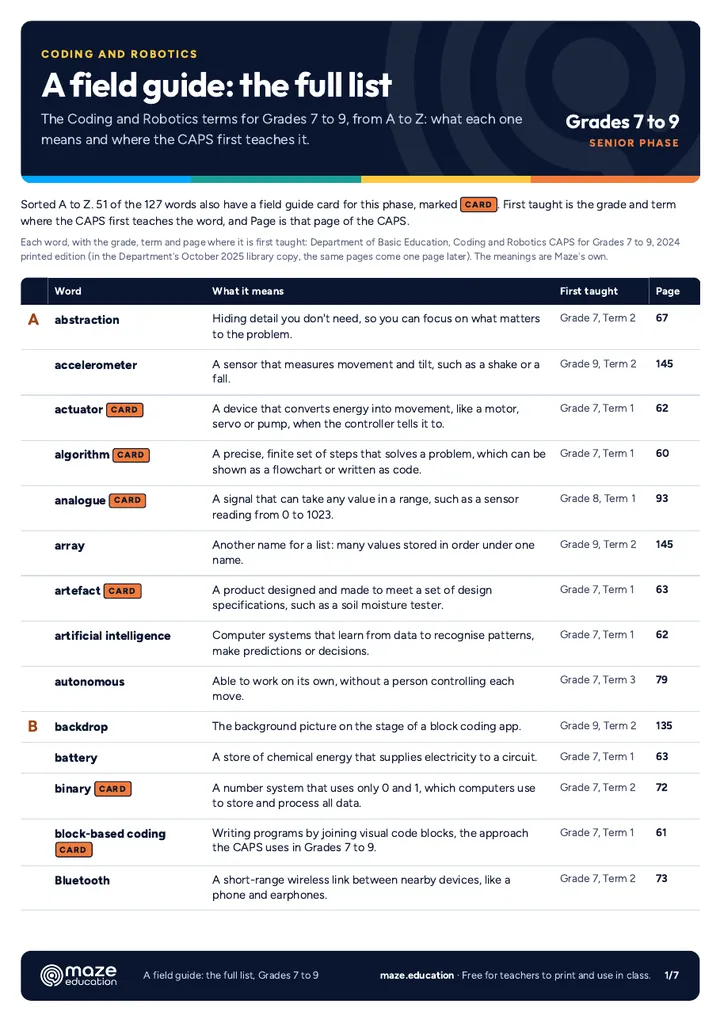
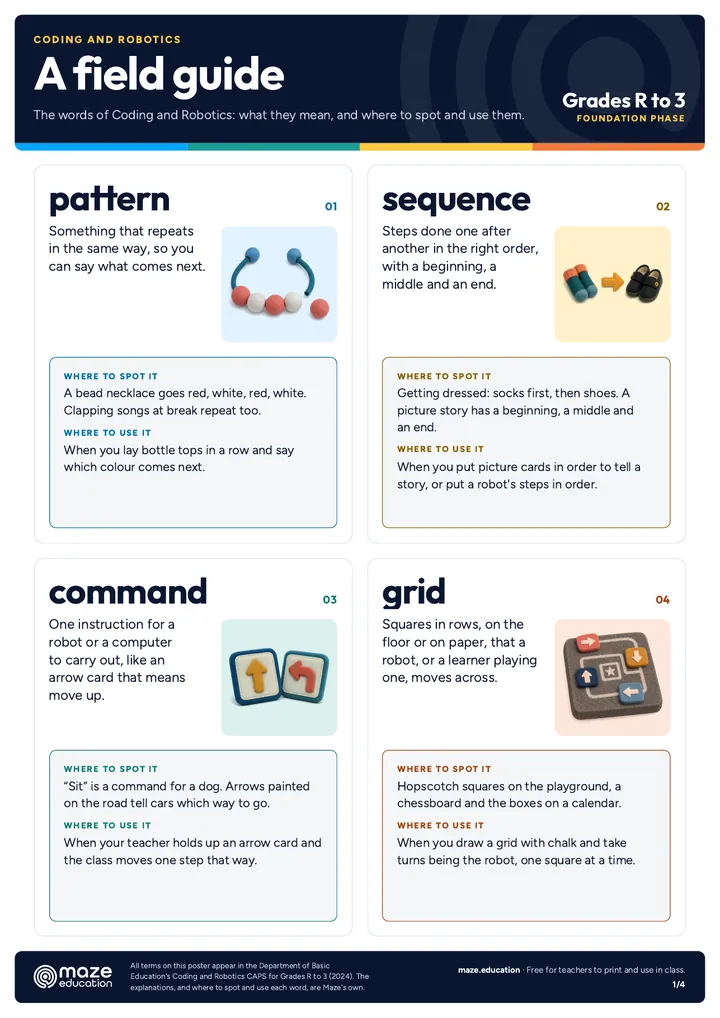
A field guide to Coding and Robotics words

Three printables for each phase, from its own CAPS. The poster and the word wall cards give each word with a picture, what it means, where to spot it and where to use it. The full list gives the phase's terms from A to Z, with where the CAPS first teaches each one.

Questions teachers ask.

No. Each lesson tells you which block to drag from which drawer, and the MakeCode simulator lets you test everything on screen before a board is plugged in. If you would like a hand, we run micro:bit teacher training for your staff.

Most lessons work on any micro:bit. Lessons that use the microphone or data logging need a micro:bit V2, and they say so at the top. Every kit we sell is a V2.

Where 2Simple has a matching micro:bit unit or project in Purple Mash, the lesson's Purple Mash tab names it and gives our steps for Free Code micro:bit. Purple Mash follows UK school years, which run about one grade ahead of ours, so a Year 4 unit suits roughly Grade 3.

Some are, and each lesson says how closely it matches. The Department of Basic Education has published the final Coding and Robotics CAPS for Grades R to 9 (2024 editions), which replace the 2021 drafts, and is phasing the subject into schools. Every lesson names the grade, term, topic and page it matches, with the CAPS's own words. We say aligned when every objective matches CAPS content for that grade and term, fits when the lesson covers part of it, and supports when it backs up a topic from outside the CAPS's approach, as in Grade 3, where the CAPS teaches coding without devices.

Yes. Use the print button on any lesson: the page prints as a clean A4 lesson plan, with the code you have open and a checklist to tick off.

Need boards, or a hand getting started?

We supply BBC micro:bit V2 kits, from one board to a classroom pack of 30, and train teachers to run their first lesson the next day.

Written by Maze Education. Some ideas here, like the name badge and the step counter, are classic first micro:bit projects. For more, see the Micro:bit Educational Foundation's free lessons on microbit.org. Lessons on microbit.org ↗ (opens in a new tab)

micro:bit is a trade mark of the Micro:bit Educational Foundation, and BBC is a trade mark of the British Broadcasting Corporation. Maze Education is an independent reseller of genuine BBC micro:bit products. Our teacher training and our other products and services are our own, and are not endorsed by the Foundation or the BBC.

Starting coding at your school?

Tell us your grades and how many learners, and we help you choose the kits and plan the first lessons.

What happens next

  1. We reply within one working day.
  2. If it helps, we set up a free 20-minute call about your school.
  3. Anything with a cost, we price in writing before it is booked.

Prefer to pick a time? See the calendar →
Ask a question
I'm interested in

Please don't include learners' names or personal details.

We only use your details to reply, in line with POPIA.

WhatsApp